

We have set up a Slack group for the SIG – to join the group click HERE
We strongly encourage you to join the Slack group to improve our effectiveness as a group. If it proves to be not suitable for you, you can leave the group later.
When you sign in please ensure your name allows others to know who you are – no nicknames please
Some of you are already familiar with the software and will no doubt agree it offers a great platform to facilitate discussion.
NOTE: While we would like everyone to join, you DO NOT have to join Slack. If you are not in Slack you will continue to receive emails about activities. You can also join the LinkedIn Group, WhatsApp Group and send emails to SIG_Africa@sietareu.org – click here for more on other communications platforms
More on Slack:
Slack allows us to have not only a forum for SIG members and associates to “talk” to each other, but we can also create discussion groups – called channels in Slack. We have created channels for SIG topics and for geographical regions. Join a channel to dialogue on the topic or with others in your region
There are two standard channels in Slack which you will see on the left side of the main screen.
- #general – where messages go to ALL members of our Slack group (people are automatically assigned to this channel)
- #random – where you can share random thoughts and ideas which may not be work related. Fun stuff
You can also chat one-to-one with any other member you choose – just click on the name and start chatting, only the two people see the comments. You can also add others to the conversation – as many as you like. You can make calls with video if you choose but only with one other person. With the free version we cannot make group calls.
Slack can be used in three ways
- Within your browser
- As a Desktop App – you don’t need to open a browser and messages appear on your screen
- As an app on your phone – look for Slack in your relevant app store
For the SIG Group we suggest you install the Desktop App and the mobile phone version for the best interaction with the group.
There are many other capabilities of Slack and you are encouraged to explore and share any useful tips with the group. You can also read more about Slack in our SIG below.
Using Slack in SIG Africa
We are learning about Slack as we go. It has enormous capabilities and no-one in the leadership team claims to be an expert! If you have ideas join the #ideas-for-slack channel and suggest away!
Channels
To make the use of Slack in the SIG most effective we have created “channels” to match both our list of Topics and Regions where people are based
For example – some of the topics

And a sample of the regions
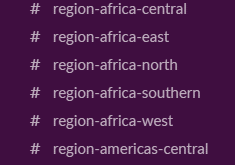
(Note that the format of channel names Is restricted to lower case)
To work with others on a particular topic or connect with others in your region just join the relevant channel! TIP: While you are free to join any and all channels it is probably best to join only those you have an interest in.
So, for example, if you are particularly interested in Education just join the channel #topic-education.
And, if you are the East-Africa region, simply join the channel #region-east-africa to connect with others in that region.
A note on regions: regions are not defined absolutely, and we can redefine them as the group sees fit. We have used the Wikipedia listing of Regions of Africa as a starting point. This listing puts Rwanda in the East Africa region but some might say that it is closer to the Central Africa region so our Rwandan members might want to join both regions
Once you are in the channel you will be able to see and connect with others interested in the topic or based in the region
Profiles in Slack
Each person in Slack has a profile. Because we have the free version we are limited in the data fields we have to use.
TIPS for Profile:
- Do include a photo
- Use the “What I do” field to tell the group about who you are.
- Do add an email address (this will also prompt you when you are mentioned in Slack)
For those of you not familiar with Slack you might like to read these articles: